Thursday, 28 April 2016

Ways to copy array in Java ? Which one is better ?

 There are  mainly  three ways : 

1) Using Loop

2) System.arrayCopy();

3) Arrays.copyOf() &&  Arrays.copyOfRange() 


    Lets go in brief with array copy.

1. Using Loop
 
  • We all know array start with index 0,so using loop you can initialize variable and put condition with array size like     array_name.length (Be remember its property not method).
  • Now iterate loop and copy one by one element into another array.
  •  Following is example for array Copy using for loop. 

  package com.my;
class Array_Loop{
public int[] copyArrayByLoop (int[] myArray){
int length = myArray.length;
int[] copy = new int [length];
for(int i=0;i<length;i++){
copy [i] = myArray[i];
}
return copy;
}
}


2. System.arrayCopy()

  • It depends on the virtual machine, but it looks as if it copies blocks of memory instead of copying single array elements. 
  • This would absolutely increase performance. It's always preferred over loops when performance is an issue.
  • System.arraycopy() uses JNI (Java Native Interface) to copy an array (or parts of it), so it is amazingly fast.

public static native void arraycopy(Object src,  int  srcPos,Object dest, int destPos,int length);

  • If dest is null, then a NullPointerException is thrown.
  • If src is null, then a NullPointerException is thrown and the destination array is not modified.
  • Otherwise, if any of the following is true, an ArrayStoreException is thrown and the destination is not modified:

  • The src argument refers to an object that is not an array.
  • The dest argument refers to an object that is not an array.
  • The src argument and dest argument refer to arrays whose component types are different primitive types.
  • The src argument refers to an array with a primitive component type and the dest argument refers to an array with a reference component type.
  • The src argument refers to an array with a reference component type and the dest argument refers to an array with a primitive component type.
  • Otherwise, if any of the following is true, an IndexOutOfBoundsException is thrown and the destination is not modified:
  • The srcPos argument is negative.
  • The destPos argument is negative.
  • The length argument is negative.
  • srcPos+length is greater than src.length, the length of the source array.
  • destPos+length is greater than dest.length, the length of the destination array.


 3. Arrays.copyOf() &&  Arrays.copyOfRange()

int []return  = Arrays.copyOf(int[] array,int newLength)


  • Copies the specified array, truncating or padding with false (if necessary) so the copy has the specified length. 
  • For all indices that are valid in both the original array and the copy, the two arrays will contain identical values. 
  • For any indices that are valid in the copy but not the original, the copy will contain false. 
  • Such indices will exist if and only if the specified length is greater than that of the original array.
  • Arrays.copyOf(T[], int) is easier to read. Internaly it uses System.arraycopy() which is a native call.
  • NegativeArraySizeException - if newLength is negative
  • NullPointerException - if array is null

byte []return  = Arrays.copyOfRange(byte[] array,int from,int to)

  • Copies the specified range of the specified array into a new array. 
  • The initial index of the range (from) must lie between zero and original.length, inclusive. 
  • The value at array[from] is placed into the initial element of the copy (unless from == original.length or from == to). 
  • Values from subsequent elements in the original array are placed into subsequent elements in the copy. The final index of the range (to), which must be greater than or equal to from, may be greater than original.length, in which case null is placed in all elements of the copy whose index is greater than or equal to original.length - from. 
  • The length of the returned array will be to - from.
  • ArrayIndexOutOfBoundsException - if from < 0 or from > original.lengt
  • IllegalArgumentException - if from > to
  • NullPointerException - if original is null

Thursday, 14 April 2016

What is the output for following String Literals


  • Literal strings within the same class  in the same package  represent references to the same String object.

  • Literal strings within different classes in the same package represent references to the same String object.

  •  Literal strings within different classes in different packages likewise represent references to the same String object.

  • Strings computed by constant expressions are computed at compile time and then treated as if they were literals.

  • Strings computed by concatenation at run time are newly created and therefore distinct.

  •  The result of explicitly interning a computed string is the same string as any pre-existing literal string with the same contents.


package testPackage;
class Test {
    public static void main(String[] args) {
       String hello = "Hello", lo = "lo";
       System.out.print((hello == "Hello") + " ");
       System.out.print((Other.hello == hello) + " ");
       System.out.print((other.Other.hello == hello) + " ");
       System.out.print((hello == ("Hel"+"lo")) + " ");
       System.out.print((hello == ("Hel"+lo)) + " ");
       System.out.println(hello == ("Hel"+lo).intern());
   }
}
class Other { static String hello = "Hello"; }

and the compilation unit: 

package other; 
public class Other { public static String hello = "Hello"; } 
produces the output:

true   true    true    true   false   true

Command Line Arguments In Java

A Java application can accept any number of arguments from the command line. This allows the user to specify configuration information when the application is launched.

The user enters command-line arguments when invoking the application and specifies them after the name of the class to be run.

class Test { 
 public static void main(String[] args) {
      for (int i = 0; i < args.length; i++)
          System.out.println( args[i]);
 }
}


On a machine with the Oracle JDK installed, this class, stored in the file Test.java,
can be compiled and executed by giving the commands:


javac Test.java

java Test Drink Hot Java

producing the output:

Drink
Hot
Java


To have Drink, Hot, and Java interpreted as a single argument, the user would join them by enclosing them within quotation marks.

java Test "Drink Hot Java"

Drink Hot Java

Parsing Numeric Command-Line Arguments

 It must convert a String argument to respective types.Here is a code snippet that converts a command-line argument to respective types:


Class ParseCommandLine{
   public static void main(String args[]){
     String str = args[0]
     int i  = Integer.parseInt(args[1]);
     float f  = Integer.parseFloat(args[2]);
     double d  = Integer.parseDouble(args[3]);
     boolean b  = Integer.parseBoolean(args[4]);

     System.out.println(str);
     System.out.println(i);
     System.out.println(f);
     System.out.println(d);
     System.out.println(b);
   }
}

How To Compile & Run : 

javac ParseCommandLine 

java ParseCommandLine MyJava 15   2.4   5.67  true

Output :

MyJava 
15 
2.4 
5.67 true

Tuesday, 11 August 2015

How To Store UTF-8 Character in MySql


What is UTF-8 ?


  • UTF-8 & UTF 16 are Unicode Character Sets.
  • UTF-8 is the preferred encoding for e-mail and web pages. 
  • UTF-8 is variable-length and uses 8-bit code units.
  • UTF-8 is backwards compatible with ASCII.


How to handle with mysql?

First of all check character set and collation of  your database,to execute following query :

SHOW VARIABLES LIKE "character_set_database";

Variable_name                 Value
-----------------------------------------------    
character_set_database      latin1


SHOW VARIABLES LIKE "collation_database";

Variable_name                     Value          
-----------------------------------------------------------
collation_database            latin1_swedish_ci

OR you can also execute this query : SHOW VARIABLES LIKE  'char%';

As a result you get result like this:


  • So here default character set is UTF 8 so no big bloom..if not then whenever you create table set CHARSET=utf8 and Collation = utf8_general_ci

Let us create one table :

CREATE TABLE product (
  id bigint(20) NOT NULL AUTO_INCREMENT,
  name varchar(50) NOT NULL,
  PRIMARY KEY (id)
) ENGINE=InnoDB DEFAULT CHARSET=utf8


If you have already created table then execute following alter query

ALTER TABLE product 
MODIFY `name` VARCHAR(255) CHARACTER SET utf8 NOT NULL DEFAULT ''

Now you can insert or update utf-8 character easily..enjoy..lots..!!!!


Tuesday, 4 August 2015

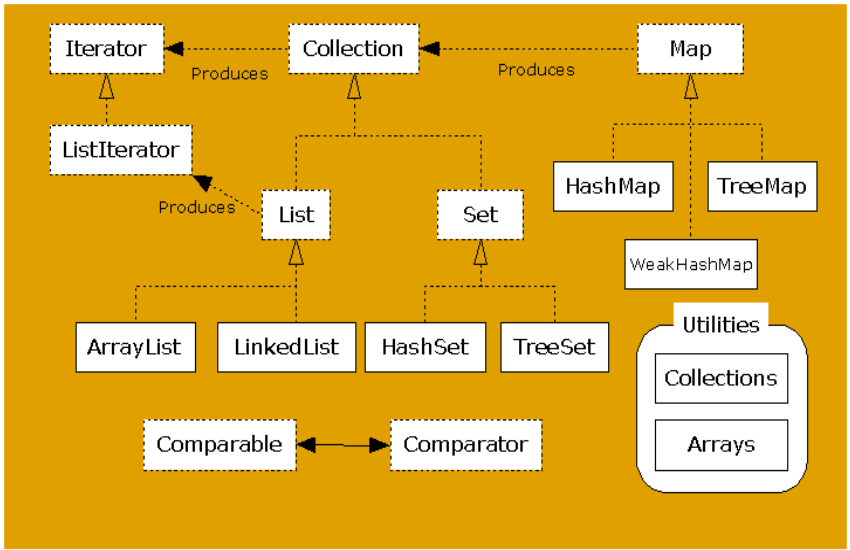
Java Collection Set : Difference between Hashset and Treeset

Java Collection

  • A collection is a group of data manipulate as a single object. 
  • Collections are primarily defined through a set of interfaces.
  • Interfaces are used of flexibility reasons
    • Programs that uses an interface is not tightened to a specific implementation of a collection.
    • It is easy to change or replace the underlying collection class with another (more efficient) class that implements the same interface.
  • HashSet and TreeSet implement the interface Set.
  • HashSet is much faster than TreeSet (constant-time versus log-time for most operations like add, remove and contains) but offers no ordering guarantees like TreeSet.
  • HashSet
    • Class offers constant time performance for the basic operations (add, remove, contains and size).
    • It does not guarantee that the order of elements will remain constant over time.
    • Iteration performance depends on the initial capacity and the load factor of the HashSet.
    • It's quite safe to accept default load factor but you may want to specify an initial capacity that's about twice the size to which you expect the set to grow.
  • TreeSet
    • Guarantees log(n) time cost for the basic operations (add, remove and contains) .
    • Guarantees that elements of set will be sorted (ascending, natural, or the one specified by you via its constructor) (implements SortedSet).
    • Doesn't offer any tuning parameters for iteration performance
    • Offers a few handy methods to deal with the ordered set like first(), last(), headSet(), and tailSet() etc.
  • Important points:
    •  Both guarantee duplicate-free collection of elements.
    •  It is generally faster to add elements to the HashSet and then convert the collection to a TreeSet for a duplicate-free sorted traversal.
    •  None of these implementation are synchronized. That is if multiple threads access a set concurrently, and at least one of the threads modifies the set, it must be synchronized externally.
    • LinkedHashSet is in some sense intermediate between HashSet and TreeSet. Implemented as a hash table with a linked list running through it, however it provides insertion-ordered iteration which is not same as sorted traversal guaranteed by TreeSet.
  • So choice of usage depends entirely on your needs but I feel that even if you need an ordered collection then you should still prefer HashSet to create the Set and then convert it into TreeSet.
  • e.g. SortedSet<String> s = new TreeSet<String>(hashSet);

Monday, 3 August 2015

Big Oh notation

  • For run time complexity analysis we use big Oh notation extensively so it is vital that you are familiar with the general concepts to determine which is the best algorithm for you in certain scenarios. 
  • We have chosen to use big Oh notation for a few reasons, the most important of which is that it provides an abstract measurement by which we can judge the performance of algorithms without using mathematical proofs.
The following list explains some of the most common big Oh notations : 


  • O(1) constant: the operation doesn't depend on the size of its input, e.g. adding a node to the tail of a linked list where we always maintain a pointer to the tail node.

  •  O(n) linear: the run time complexity is proportionate to the size of n

  •  O(log nlogarithmic: normally associated with algorithms that break the problem into smaller chunks per each invocation, e.g. searching a binary search tree.

  • O(n log njust n log n : usually associated with an algorithm that breaks the problem into smaller chunks per each invocation, and then takes the results of these smaller chunks and stitches them back together, e.g. quick sort.
  • (n^2quadratic: e.g. bubble sort.
  • O(n^3) cubic: very rare.
  • O(2n) exponential: incredibly rare.


  • If you encounter either of the latter two items (cubic and exponential) this is really a signal for you to review the design of your algorithm. 
  • While prototyping algorithm designs you may just have the intention of solving the problem irrespective of how fast it works. We would strongly advise that you always review your algorithm design and optimize where possible|particularly loops recursive calls|so that you can get the most efficient run times for your algorithms.
  • Taking a quantitative approach for many software development properties will make you a far superior programmer - measuring one's work is critical to success.

Thursday, 16 July 2015

In Java to encode Base64 in Java


  • Base64 is a straight forward encoding for binary data into readable characters.
  • The Java class is the javax.xml.bind.DatatypeConverter, which is part of the XML package (JAXB) and has a method called printBase64Binary() that takes in a byte array and returns a encoded BASE64 string.
  • The following is a code snippet that encoding the user name and password for BASIC Authentication for Web applications.
  • It combines a user name and corresponding password with “:” as delimiter, and converts it to an byte array that can be feed into the printBase64Binary(). Once the encoded string is ready, just set it as value to the Authorization header. 

The following code is how to do the encoding and set it as a HTTP header in request to server:
     
import javax.xml.bind.DatatypeConverter;

String encoding = 
DatatypeConverter.printBase64Binary((username + ":" + password).getBytes("UTF-8"));
  
urlConn.setRequestProperty("Authorization", "Basic " + encoding);


Depending the client library, your API to set the header could be different. For example, if you use Apache Thrift’s HTTP transport, the code may look like the following:

import org.apache.thrift.transport.THttpClient;
 
transport.setCustomHeader("Authorization", "Basic " + encoding);

Sunday, 28 June 2015

How to calculate difference of date and time in Java


To calculate date and time difference with manual calculation...

  • Very first step to convert date into milliseconds (ms)
    • String date1 = "01-02-2015 09:15:20";
    • SimpleDateFormat format = new  SimpleDateFormat("yyyy-MM-dd HH:mm:ss");
      • HH convert into 24 hours format (0-23)
      • hh convert into 12 hours format
    •  Date d1 = format.parse(date1);
    • long ms = d1.getTime();


Thursday, 25 June 2015

Angular JS Directice in IE8


  • The most powerful feature Directive in Angular JS. 
  • Allow you to create custom reusable components. 
  • Few exception are there...keep in mind..!!!
  • With IE8 Angular Js should work consistent like other browser.
  • Four ways to create directive
    1. Angular JS viz. Attribute  (Common One)
    2. Element (Common One)
    3. Class
    4. Comment
  •  Let take one example :
    • Your directive is like : <div my-js-control>....</div>
    • Now use this directive in IE8
    • Copy following syntax and paste it in your HTML/JSP page.
<Html>
    <head>

   <!--[if lte IE 8]>
      <script>
        document.createElement('div-my-js-control');
      </script>
    <![endif]-->

   </head>
</html>


  • This document.createElement() creates an element called 'my-js-control' which can use in application.
  • If you create more than one directive in your system then you need to create that many new elements for older browser
  • Long story short : It is preferable to use Angular JS directive in IE8 as attributes.


Friday, 3 April 2015

public class A {
   public static void main(String[] args) {
      

     Integer i1=100; Integer i2=100;
     System.out.println(i1==i2);//true
    

     Integer i3=200; Integer i4=200;
    System.out.println(i3==i4);//false ??
   }
}


Conclusion :

  • The Integer wrapper class interns the objects from -127 to +128. So all Integers with a value less than 128 are the same as they are interned. The values greater than 128 are not the same because they are not interned.
  • The JVM will create a cache of objects(something similar to the string constant pool) for the above range and assigns the same object(if it already exists) when ever a new object with the same value is created. So in your case, the two Integers for 100 will use the same object and the ones for 200 won't be the same.
  • you assign a integral literal to a Integer reference, it will invoke the Integer.valueOf(..) method.
  • This method uses the famous Fly-weigh pattern. That is that the -128~127 integers are cached. So the "i1==i2" will be true. Of course, you can change the cache range by setting IntegerCache.low or IntegerCache.high which are static variables.
  • Always compare wrapper classes with equals(e).


Wednesday, 3 September 2014

Java : Externalizable vs Serializable

  • Externalizable is an interface that enables you to define custom rules and your own mechanism for serialization. Serializable defines standard protocol and provides out of the box serialization capabilities.
  • Externalizable extends Serializable.
  • Implement writeExternal and readExternal methods of the Externalizable interface and create your own contract / protocol for serialization.
  • Saving the state of the supertypes is responsibility of the implementing class.
  • You might have seen in my previouse article on how to customize the default implementation of Serializable. These two methods readExternal and writeExternal (Externalizable) supersedes this customized implementation of readObject and writeObject.
  • In object de-serialization (reconsturction) the public no-argument constructor is used to reconstruct the object. In case of Serializable, instead of using constructor, the object is re-consturcted using data read from ObjectInputStream.
  • The above point subsequently mandates that the Externalizable object must have a public no-argument constructor. In the case of Seriablizable it is not mandatory.
  • Behaviour of writeReplace and readResolve methods are same for both Serializable and Externalizable objects. writeReplace allows to nominate a replacement object to be written to the stream. readResolve method allows to designate a replacement object for the object just read from the stream.
  • In most real time scenarios, you can use Serializable and write your own custom implementation for serialization by providing readObject and writeObject.
You may need Externalizable,
  1. If you are not happy with the way java writes/reads objects from stream.
  2. Special handling for supertypes on object construction during serialization.

Java : Call main method before JVM Call

Static blocks are also called Static initialization blocks . A static initialization block is a normal block of code enclosed in braces, { }, and preceded by the static keyword. Here is an example:
 
static {
// whatever code is needed for initialization goes here
}

 
A class can have any number of static initialization blocks, and they can appear anywhere in the class body. The runtime system guarantees that static initialization blocks are called in the order that they appear in the source code. 
 
And dont forget, this code will be executed when JVM loads the class. JVM combines all these blocks into one single static block and then executes. Here are a couple of points I like to mention:

public class Test {

    static {
        Test.main("From static Block");
    }


    public static void main(String... args) {
        if (args.length > 0) {
            System.out.println(args[0]);
        } else {
            System.out.println("By JVM");
        }
    }
}

Monday, 1 September 2014

Java Puzzel : OutOfMemory

Try compiling and running the code below - then uncomment for loop compile and run.
Why does this program have an error when for loop is commented out?

Monday, 25 August 2014

Valid main method signature

public static void main(String[] argument)
public static void main(String argument[])
public static void main(String... args)
public static synchronized void main(String... args)
public static strictfp void main(String... args)
public static final void main(String... args)

Q: Can main method throw Exception in Java?
A: indeed main method can throw Exception both checked and unchecked.

Q: Can main method be overloaded in java?
A: Yes main method in java can be overloaded but JVM will only invoke main method with standard signature.

Q: Can main method be overridden in java?
A: Yes main method in java can be overridden and the class you passed to java command will be used to call main method.

Thursday, 7 August 2014

Difference between java.lang.NoClassDefFoundError and ClassNotFoundException in Java


Exception in thread "main" java.lang.NoClassDefFoundError

  •  ClassNotFoundException
    • Many a times we confused ourselves with java.lang.ClassNotFoundException and java.lang.NoClassDefFoundError, though both of them related to Java Classpath they are completely different to each other. 
    • ClassNotFoundException comes when JVM tries to load a class at runtime dynamically means you give the name of class at runtime and then JVM tries to load it and if that class is not found in classpath it throws java.lang.ClassNotFoundException.
  •  NoClassDefFoundError
    •  While in case of NoClassDefFoundError the problematic class was present during Compile time and that's why program was successfully compile but not available during runtime by any reason. 
    • NoClassDefFoundError is easier to solve than ClassNotFoundException in my opinion because here we know that Class was present during build time but it totally depends upon environment.
    •  If you are working in J2EE environment than you can get NoClassDefFoundError even if class is present because it may not be visible to corresponding ClassLoader. 


Thursday, 24 July 2014

What is a reasonable order of Java modifiers (abstract, final, public, static, etc.)?

It is reasonable to use the order according to the Java Virtual Machine Specification, Table 4.4
  • public           
  • protected
  • private
  • abstract
  • static
  • final
  • transient
  • volatile
  • synchronized
  • native
  • strictfp

Can you override Static Methods in Java?

  • Well... the answer is NO if you think from the perspective of how an overriden method should behave in Java. But, you don't get any compiler error if you try to override a static method. That means, if you try to override, Java doesn't stop you doing that; but you certainly don't get the same effect as you get for non-static methods.
  •  Overriding in Java simply means that the particular method would be called based on the run time type of the object and not on the compile time type of it (which is the case with overridden static methods).
  •  Okay... any guesses for the reason why do they behave strangely? Because they are class methods and hence access to them is always resolved during compile time only using the compile time type information. 
  • Accessing them using object references is just an extra liberty given by the designers of Java and we should certainly not think of stopping that practice only when they restrict it :-)

Example: let's try to see what happens if we try overriding a static method:-

class SuperClass{
......
public static void staticMethod(){
System.out.println("SuperClass: inside staticMethod");
}
......
}

public class SubClass extends SuperClass{

......
//overriding the static method
public static void staticMethod(){
System.out.println("SubClass: inside staticMethod");
}

......

public static void main(String []args){
......
SuperClass superClassWithSuperCons = new SuperClass();
SuperClass superClassWithSubCons = new SubClass();
SubClass subClassWithSubCons = new SubClass();

superClassWithSuperCons.staticMethod();

superClassWithSubCons.staticMethod();
subClassWithSubCons.staticMethod();
...
}

}


Output:-

SuperClass: inside staticMethod
SubClass: inside staticMethod

  • Notice the second line of the output. Had the staticMethod been overriden this line should have been identical to the third line as we're invoking the 'staticMethod()' on an object of Runtime Type as 'SubClass' and not as 'SuperClass'. 
  • This confirms that the static methods are always resolved using their compile time type information only.

Tuesday, 15 July 2014

Difference between string object and string literal

When you do this:

String str = "abc";

You are calling the intern() method on String. This method references an internal pool of 'String' objects. If the String you called intern() on already resides in the pool, then a reference to that String is assigned to str. If not, then the new String is placed in the pool, and a reference to it is then assigned to str.

Given the following code:

String str = "abc";
String str2 = "abc";
boolean identity = str == str2;

When you check for object identity by doing == (you are literally asking - do these two references point to the same object?), you get true.

However, you don't need to intern() Strings. You can force the creation on a new Object on the Heap by doing this:

String str = new String("abc");
String str2 = new String("abc");
boolean identity = str == str2;

In this instance, str and str2 are references to different Objects, neither of which have been interned so that when you test for Object identity using ==, you will get false.

In terms of good coding practice - do not use == to check for String equality, use .equals() instead.

Saturday, 14 June 2014

When initialization occurs in an interface?


    • According to Java language specification, initialization of an interface consists of executing the initializers for fields declared in the interface. Before a class is initialized, its direct superclass must be initialized.
    • But interfaces implemented by the class need not be initialized. Similarly, the superinterfaces of an interface need not be initialized before the interface is initialized. Initialization of an interface does not, of itself, cause initialization of any of its superinterfaces.
    • Following is example for this :
    • The reference to J.i is to a field that is a compile-time constant; therefore, it does not cause I to be initialized. The reference to K.j is a reference to a field actually declared in interface J that is not a compile-time constant; this causes initialization of the fields of interface J, but not those of its superinterface I, nor those of interface K. Despite the fact that the name K is used to refer to field j of interface J, interface K is not initialized.
    • System.out.println(J.i); // The i variable is inherited from I but since it is a constant - you don't have to go through the whole process of initializing I, just reference it and get on with things.
    • System.out.println(K.j); // now this is more complicated. Since the variable holds something other than a constant, the first thing that we have to do is initialize J so that we can figure out what to DO to come up with the value of j.
    • Initializing interface J causes variable j to be initialized first: executing Test.out("j",3) which prints j=3, and setting the variable j to 3 (note the return type on the method). Now jj is initialized executing Test.out("jj",4) which prints jj=4 and sets the variable jj to 4.
    • Now that initialization is done we can evaluate and execute the println for K.j which prints the current value of j which is 3.

      An Array of Characters is Not a String

      • In the Java programming language, unlike C, an array of char is not a String, and neither a String nor an array of char is terminated by '\u0000' (the NULL character)
      • A String object is immutable, that is, its contents never change, while an array of char has mutable elements.
      • The method toCharArray in class String returns an array of characters containing the same character sequence as a String. The class StringBuffer implements useful methods on mutable arrays of characters.